ABSTRACT
Hammer AI technical guide: models, modes and privacy
Hammer AI combines a local-model desktop client with hosted chat and creative services. That architecture gives users more choice than a cloud-only interface, but it also makes broad labels unreliable. A useful review has to identify the active model route, the data path, the hardware requirement and the current commercial terms for each workflow.
- Local route
- Desktop model inference
- Hosted route
- Cloud model processing
- Main constraint
- Memory plus model size
- Review rule
- Verify each feature separately
Independent publication. Commercial controls and evidence images link to a separate third-party service.
ANSWER FIRST
What is Hammer AI in technical terms?
Hammer AI is an application layer for character chat, stories and media workflows that can call either local desktop language models or hosted services. Local inference can keep a conversation on the user's computer and work offline after setup; hosted chat, images, speech and synchronization may use Hammer AI infrastructure or third-party providers. The current privacy policy is the controlling source for online data decisions because shorter FAQ claims do not describe every provider or free-service path.[1][2]
CHARACTER INDEX
15 original characters observed in the public catalogue
This visual index samples fifteen public Original Character profiles observed on Hammer AI. It records catalogue variety only: profiles, names and availability may change after the observation date.

Taleia Vonn
Public Original Character profile observed on 19 October 2026.

Kylie
Public Original Character profile observed on 19 October 2026.

Victoria "Vicky" Hartley
Public Original Character profile observed on 19 October 2026.

Cassius
Public Original Character profile observed on 19 October 2026.

Shanikua
Public Original Character profile observed on 19 October 2026.

The Dracolyr Crisis
Public Original Character profile observed on 19 October 2026.

Kyle
Public Original Character profile observed on 19 October 2026.

Akari Saito
Public Original Character profile observed on 19 October 2026.

Rowan
Public Original Character profile observed on 19 October 2026.

Aria, the Lighthouse Keeper
Public Original Character profile observed on 19 October 2026.

Sieglinde Seyfried
Public Original Character profile observed on 19 October 2026.
XERUS, CHAOS INCARNATE
Public Original Character profile observed on 19 October 2026.

Rosivelle
Public Original Character profile observed on 19 October 2026.

Ezekiel
Public Original Character profile observed on 19 October 2026.

Ruthanne
Public Original Character profile observed on 19 October 2026.
MODE SELECTION
Which Hammer AI route should you choose?
Model selection starts with constraints, not brand names. Decide whether the data can leave the device, estimate available memory, choose an acceptable speed target and only then compare model files or hosted tiers.
| Decision | Local desktop route | Hosted route |
|---|---|---|
| Data path | Inference can remain on the computer when a local model is selected and verified offline. | Inputs and outputs travel to a service or AI provider; provider retention rules can apply.[1][2] |
| Hardware | The model file must fit RAM or VRAM with additional room for context and the application.[3] | The service supplies compute, reducing local requirements but adding network dependence. |
| Model choice | Quantized files offer different size and quality tradeoffs; custom local configurations may be possible. | The service controls the available catalog, limits and retirement schedule. |
| Offline use | Possible after the application and model files are present; test by disconnecting the network.[1] | Not an offline workflow. |
| Cost pattern | Local chat is promoted as free, but hardware, storage and electricity are user costs. | Free allowances, subscriptions and one-time credits can change on the live pricing page.[4] |
| Best fit | Private drafts, experimentation, reproducible tests and users willing to manage local resources. | Cross-device convenience, limited local hardware and features that are only offered online. |
METHOD
How was this Hammer AI review assembled?
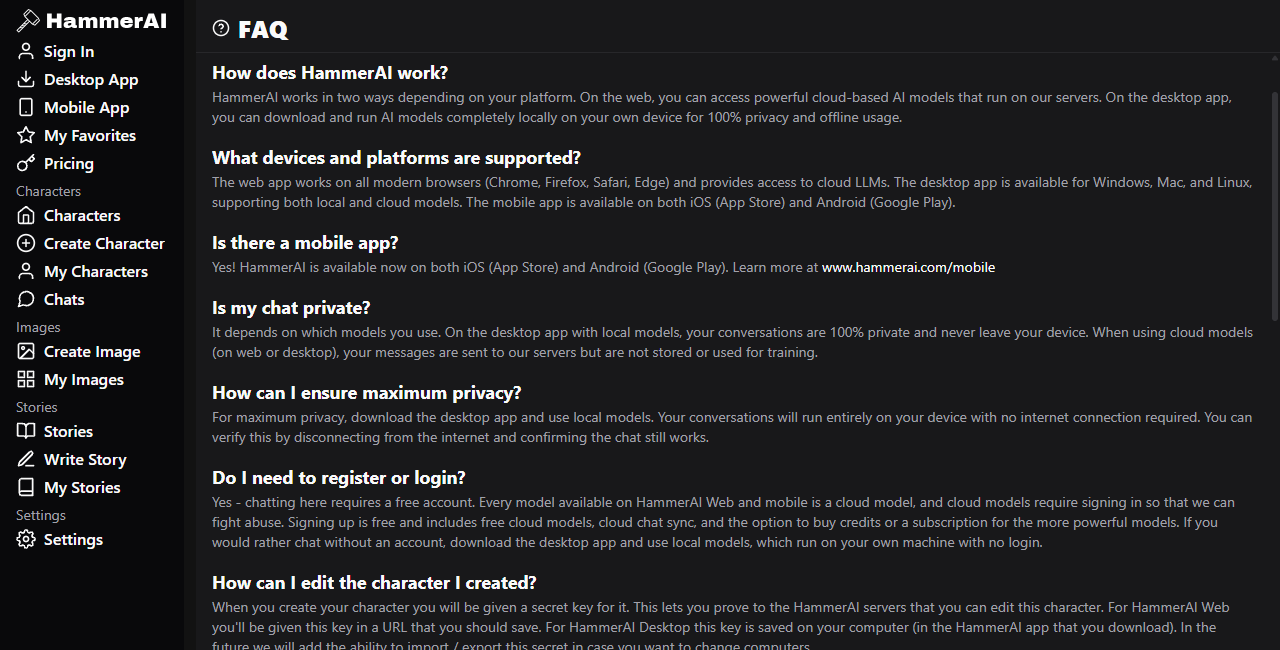
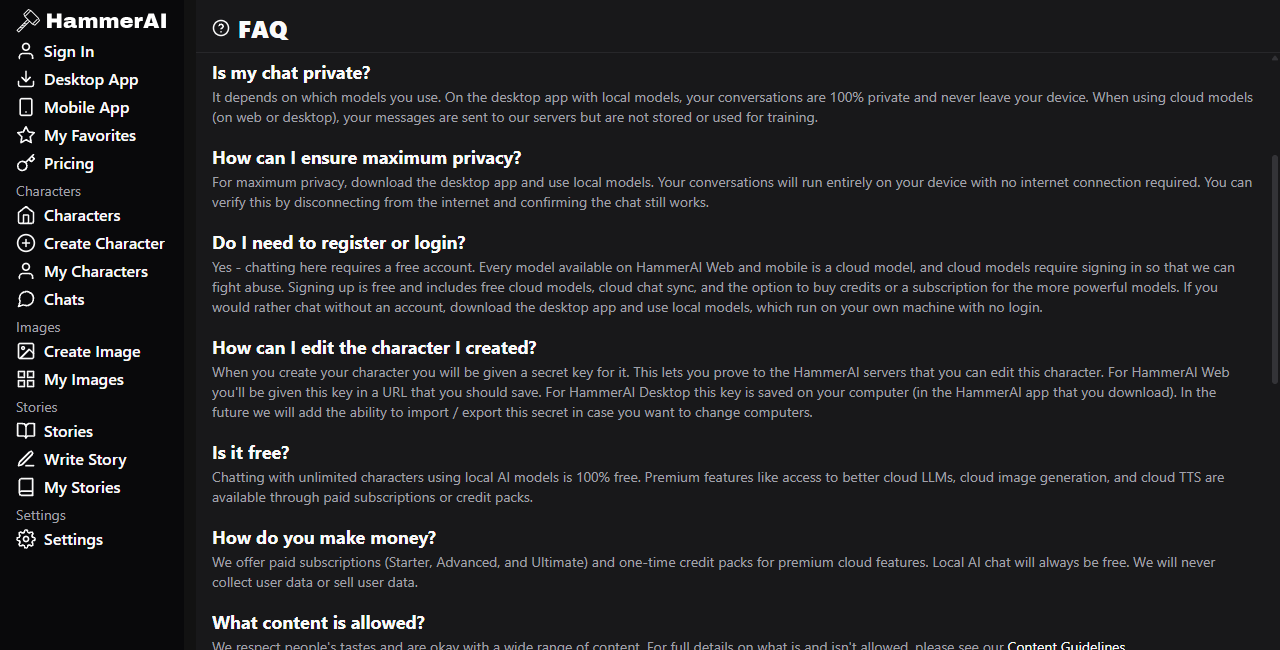
The review uses public official pages and retained browser captures dated October 19, 2026. No login, private conversation, paid transaction or model benchmark was used. Screenshots document visible controls and wording, not backend behavior. Where official pages conflict, this guide names the conflict and favors the more detailed privacy policy over a shorter marketing or FAQ summary.
This matters because the public FAQ says hosted messages are not stored or used for training, while the privacy policy says third-party AI providers may retain inputs and outputs and may use them under their own policies. The policy also describes contextual advertising for some free online services. Those statements cannot safely be compressed into “the cloud is private.[1][2]”
SYSTEM MAP
How is Hammer AI divided across local, hosted and creative systems?
Local desktop inference
A selected local model runs on the user's hardware. The public FAQ describes an offline verification test and says a local route can operate without an account.[1]
- Requires application and model downloads.
- Performance follows RAM, VRAM, CPU or GPU limits.
- Local output can still be inaccurate or unsafe.
Hosted language models
Hosted requests use remote compute. The privacy policy says external AI providers can receive prompts and outputs, and their retention or training terms may apply.[2]
- Requires a network connection.
- Catalog and context limits are service-controlled.
- Account or plan rules can change.
Creative service layer
Character definitions, lorebooks, story tools, image generation, speech and preference controls surround the model route. Each part can have its own storage, provider and credit rules.
- Prompt fields influence behavior, not truth.
- Images and speech should be evaluated as online services.
- Synchronization is a separate data path.
PROCEDURE
How should you size and test a local Hammer AI model?
Inventory the machine
Record system memory, dedicated graphics memory, free disk space and operating system. Do not choose a model solely from its parameter count or name.
Choose a conservative file
The official quantization guide describes compressed model variants and recommends leaving memory for context and other software. Smaller files load more easily; aggressive compression can reduce quality.[3]
Establish a prompt set
Use a few repeatable prompts covering instruction following, dialogue, long context and refusal behavior. A fixed set makes model comparisons more useful than a single impressive reply.
Measure the real bottleneck
Watch load time, time to first token, ongoing response speed and memory pressure. A model that fits on disk but constantly swaps memory is not a practical choice.
Verify the data path
Disconnect the network and repeat a harmless prompt. If chat stops, a hosted dependency is still active. If it continues, record the selected model and configuration so the test is reproducible.[1]
EVIDENCE PLATES
What do the retained Hammer AI screenshots actually prove?
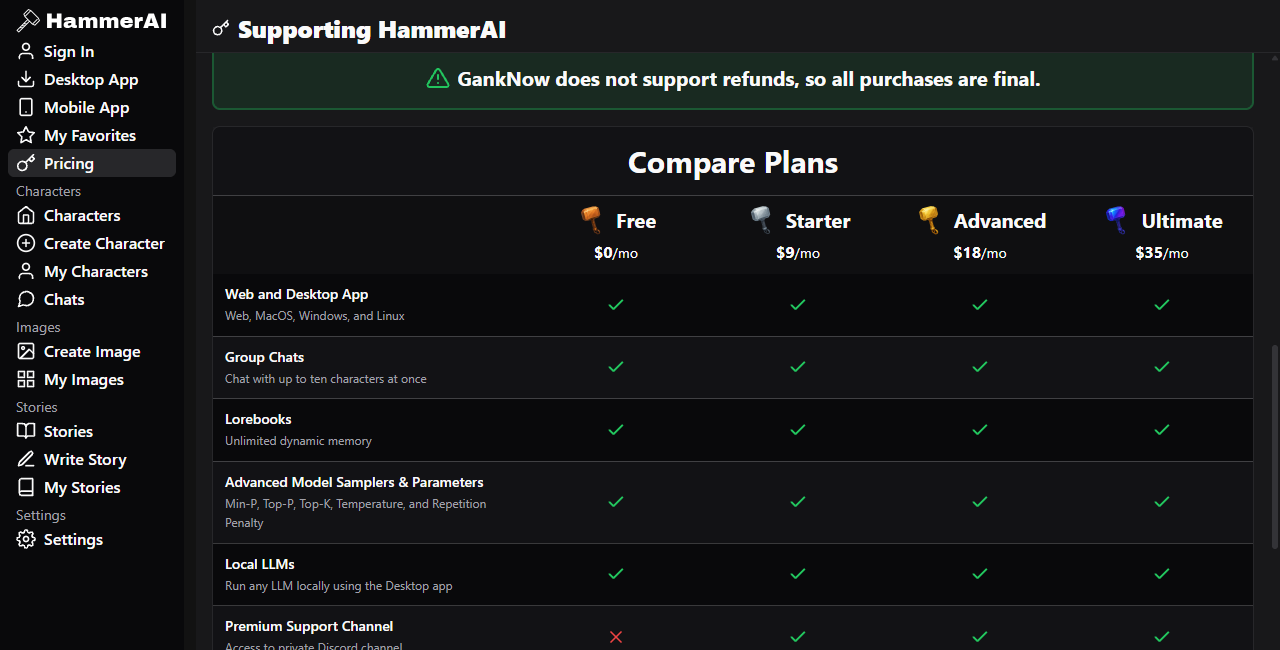
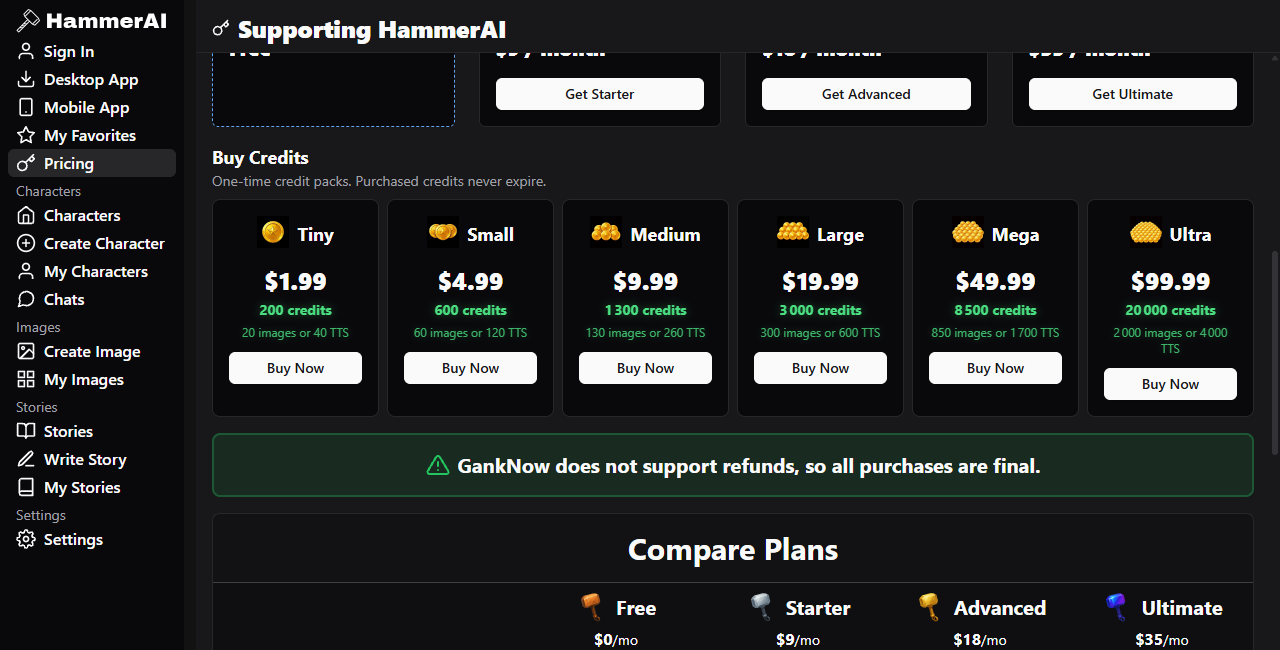
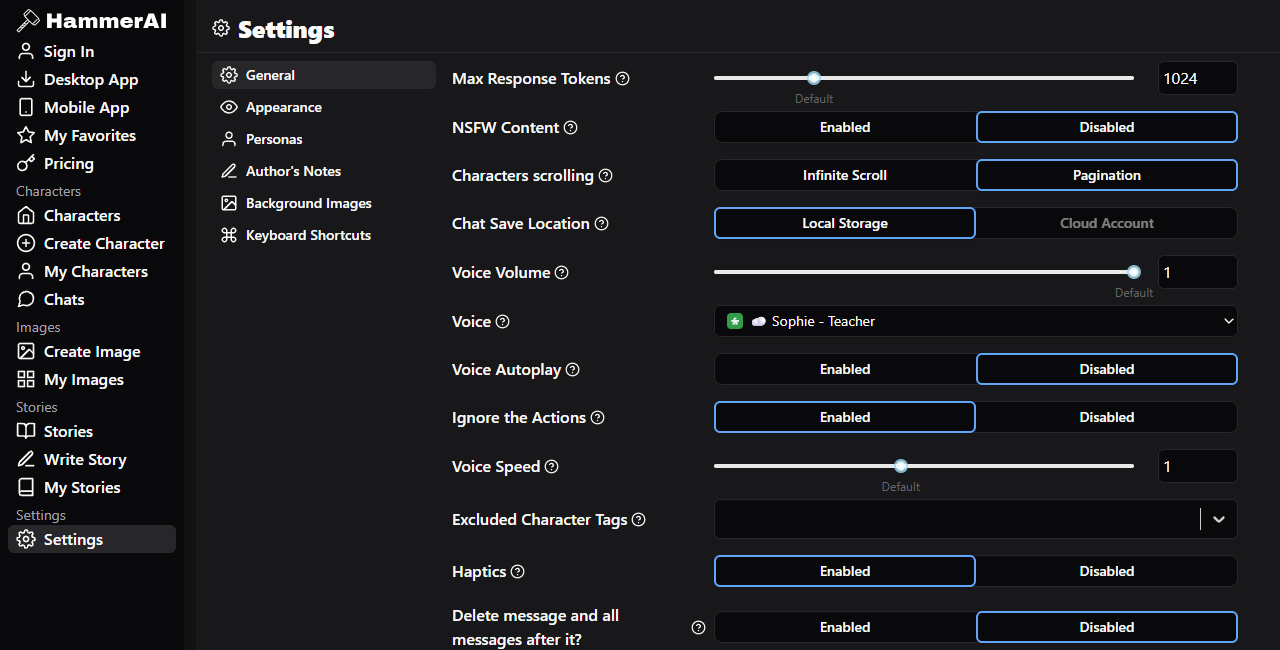
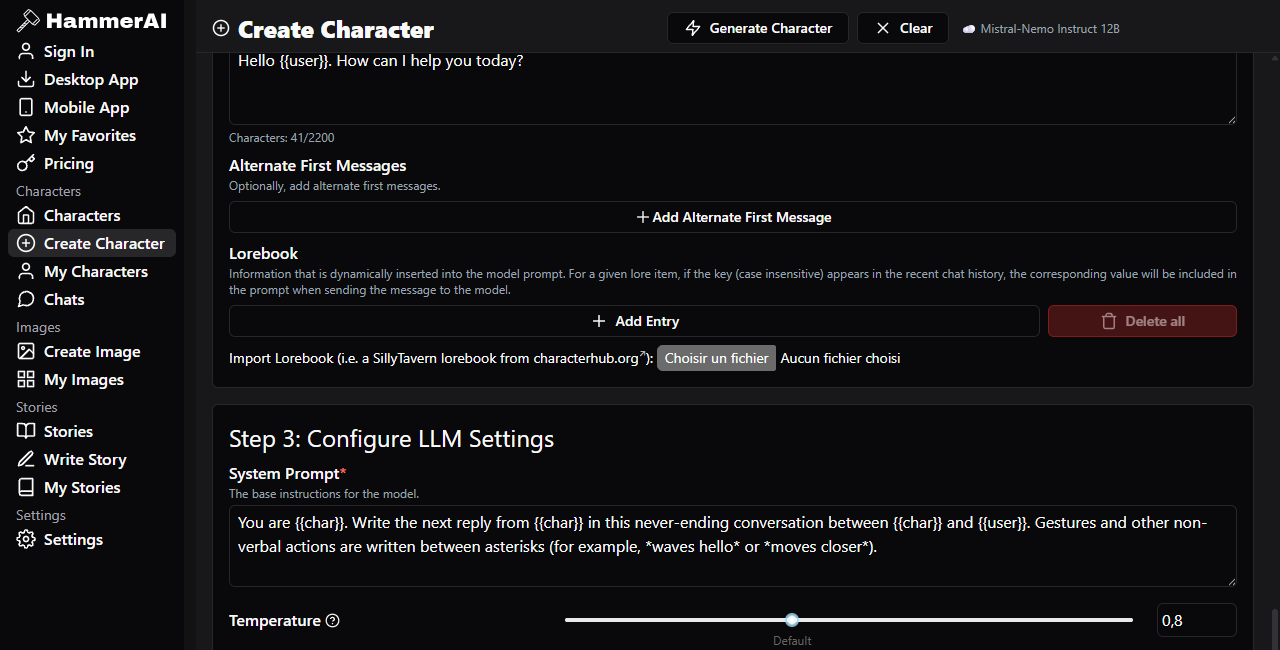
Each plate supports a narrow observation about the visible interface. None proves model quality, server behavior or current availability after the capture date.
AUDIENCE MATRIX
Who benefits from Hammer AI, and what can go wrong?
Private drafting workspace
Good fit: writers who can verify local inference and want an offline brainstorming tool. Failure mode: leaving sensitive exports, backups or logs unprotected on the same machine.
Character-system prototyping
Good fit: creators testing persona, scenario, examples and lore structure. Failure mode: treating more prompt fields as a guarantee of consistent behavior.
Local model comparison
Good fit: users comparing file sizes, quantizations and sampling settings. Failure mode: changing several controls at once and drawing conclusions from one prompt.
Hosted convenience
Good fit: users with limited hardware or cross-device needs. Failure mode: relying on a short FAQ privacy sentence without reading provider and advertising disclosures.[1][2]
Image and voice ideation
Good fit: low-risk creative experiments after checking current credits. Failure mode: uploading private, copyrighted or identifying material without understanding the online route.
Professional decision support
Poor fit: medical, legal, financial, safety or emergency decisions. Generated confidence is not evidence, and local execution does not improve factual accountability.
PRIVACY READING
How should you interpret Hammer AI's privacy claims?
Use a layered interpretation. First, a verified local desktop model can keep inference on the computer and continue without a network connection. Second, the broader product still has accounts, diagnostics, subscriptions, infrastructure and online services. Third, the privacy policy says external AI providers may process and retain hosted prompts and outputs, while some free web or mobile services may send recent content for contextual advertising. The defensible statement is that Hammer AI offers a local route, not that every Hammer AI feature is offline or provider-free.[1][2]
For sensitive work, record the exact client, selected model, sign-in state, network state and enabled feature. Avoid cloud images, speech or synchronization unless their current policy is acceptable. Device storage and local inference are different properties and should be tested separately.
VERDICT
When does Hammer AI make technical sense?
Hammer AI makes sense when a user wants one interface for local model chat and structured character workflows without building a custom front end. Its value is practical integration: model selection, character prompts, lore, stories, media tools and preferences in one product. The cost of that breadth is ambiguity. The privacy boundary changes by mode, the local experience changes with hardware, and online catalogs or allowances can change without making an old screenshot false.
Choose it for experiments you can verify and outputs you will review. Do not choose it on the assumption that every feature is local, that a larger model is always better, or that published plan details will remain fixed. The official Terms restrict use to adults and place responsibility for lawful use and generated content on the user.[5]
Explore an AI character serviceFAQ
What technical questions should you ask before using Hammer AI?
Can Hammer AI run fully offline?
Local desktop chat can run offline after installation and model download. Hosted models, synchronization, image generation and speech should be assumed to need a connection unless the current interface explicitly proves otherwise.[1]
How much memory does a model need?
The model file must fit available RAM or VRAM with extra room for context and the application. Quantization reduces file and memory requirements, but stronger compression can reduce output quality.[3]
Does a local model make output trustworthy?
No. Local describes where inference happens, not whether the answer is accurate, unbiased or safe. Apply the same verification standards to local and hosted output.
Can Hammer AI providers train on cloud chats?
The privacy policy says third-party AI providers may retain inputs and outputs and may use them to improve or train their models under their own policies. Check the named provider terms shown in the current service.[2]
Are captured prices still valid?
Not necessarily. The retained screenshots prove what the page displayed when captured. The live pricing page is the source for current subscriptions, credits, context limits and model access.[4]
Is Hammer AI intended for minors?
No. The official Terms say users must be at least 18 or the age of consent in their jurisdiction, whichever is greater.[5]
SOURCES
Which official sources support this field guide?
- [1] Hammer AI FAQ — route descriptions, offline test and account statements.
- [2] Hammer AI privacy policy — hosted providers, contextual advertising, accounts and diagnostics.
- [3] Hammer AI models and quantizations guide — memory, file size and compression tradeoffs.
- [4] Hammer AI pricing page — current plans, allowances and credit presentation.
- [5] Hammer AI Terms — adult eligibility, user responsibility and service conditions.
Observation date: October 19, 2026. Product screens, model catalogs, privacy language and commercial limits can change. Current official pages take precedence over retained captures.